
Exporting textures
Exporting writes each texture set out as normal image files that a game engine can load. Click Export in the bar at the bottom of the window.
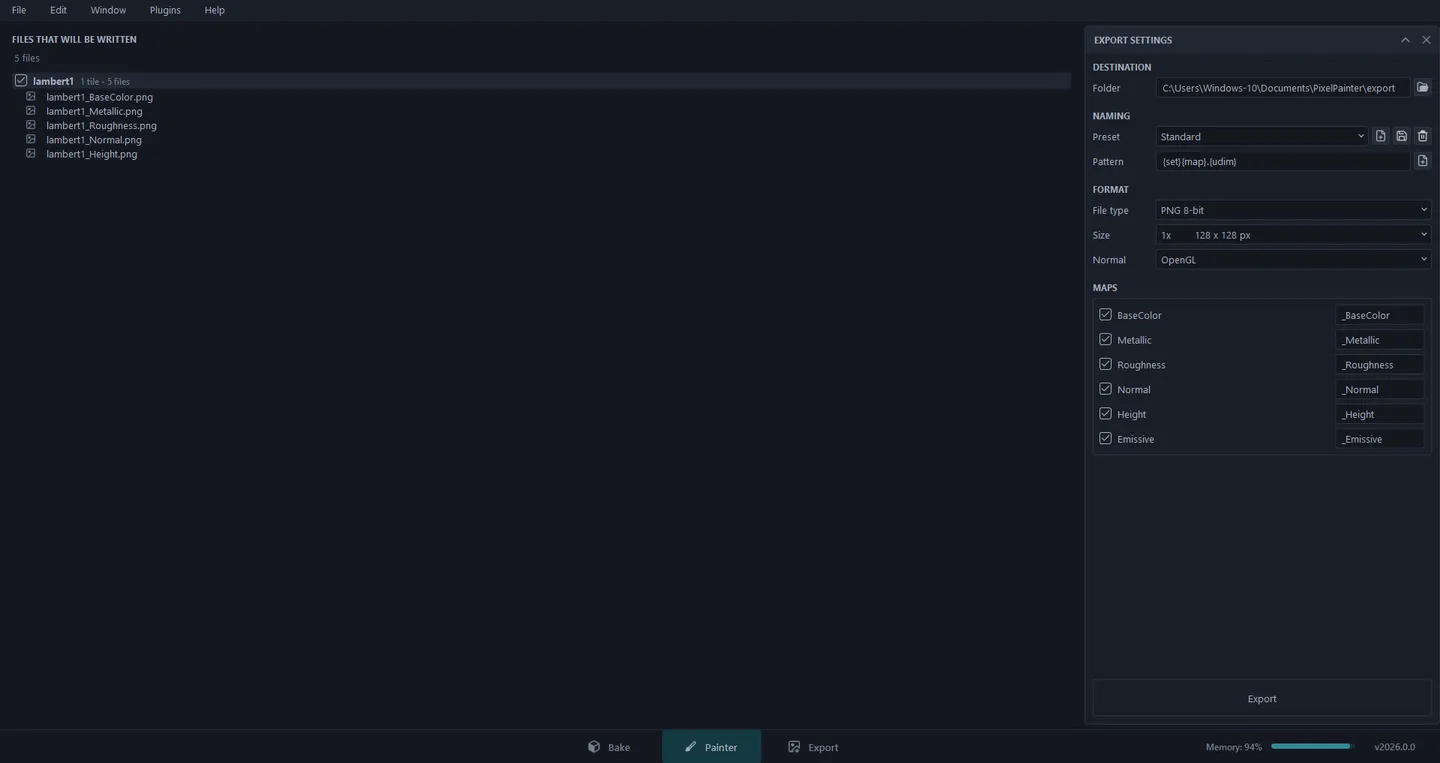
The left side lists every file that will be written, so you can check the names before anything touches the disk. Untick a texture set there to leave it out. When it looks right, click Export at the bottom right.
Export Settings
Section titled “Export Settings”Destination
- Folder - where the files go. The default is
Documents\PixelPainter\export.
Naming
- Preset - a saved naming setup. Standard comes with the app and cannot be changed. To make your own, click New (the first button next to it) to copy the current one. Your own presets can then be saved and deleted with the other two buttons.
- Pattern - how file names are built. These tags are swapped for real values:
| Tag | Becomes |
|---|---|
{set} |
the texture set name, like lambert1 |
{map} |
the map’s suffix from the Maps list, like _BaseColor |
{udim} |
the tile number, like 1001. Left out when the set has only one tile |
{res} |
the exported size in pixels |
{project} |
the project file name |
The Standard pattern {set}{map}.{udim} gives lambert1_BaseColor.png for a
one-tile set, and lambert1_BaseColor.1001.png once there is more than one.
The button at the end of the field inserts a tag for you.
Format
- File type - PNG 8 or 16-bit, TIFF 8, 16 or 32-bit float, or EXR 16 or 32-bit float. For pixel art, PNG 8-bit is almost always what you want.
- Size - 1x, 2x, 4x or 8x your project resolution. Scaling up keeps every pixel sharp and square, so a 64 x 64 texture at 8x is a crisp 512 x 512. The size never goes below the project resolution. If you want fewer pixels, lower the resolution in Edit > Project Configuration… instead.
- Normal - OpenGL or DirectX, to match your engine.
Maps
Tick the maps to write. The box on the right of each one is its suffix, and you can type a new one there. A map is only written for texture sets that have that channel, so if nothing uses Emissive, no Emissive file appears.
Mesh maps are not exported
Section titled “Mesh maps are not exported”Position, Normal, AO and Curvature from Bake mode are helpers for painting, so they do not appear in the export list.